If you’ve tried implementing Salesforce Marketing Cloud Journey Builder for your manufacturing company, you’ve probably noticed something: every example is designed for SaaS companies or retail brands. Quick sales cycles. Consumer-facing messaging. “Book a demo” CTAs everywhere.
That doesn’t work when you’re selling industrial equipment with 12-month sales cycles to committees of engineers who hate marketing fluff.
Let’s fix that. Here are four manufacturing-specific Journey Builder blueprints that actually match how your customers buy. It’s complete with decision splits, timing logic, and content strategy that works for technical audiences. Hint: not everything is AI.
Why Generic B2B Journeys Fail for Manufacturing
Before we dive into the templates, let’s talk about why you can’t just copy-paste a SaaS nurture campaign.
Manufacturing buying cycles are fundamentally different:
- 6-18 month sales cycles vs. 30-60 days for SaaS
- 5-10 stakeholders in every decision (engineering, procurement, operations, finance, safety)
- Technical specifications matter more than features – engineers want CAD files and load calculations, not benefit-driven copy
- Distributor intermediaries complicate the journey – you’re often nurturing both distributors and end users
- Post-purchase is half the revenue – installation, training, maintenance, and parts replenishment
Generic Journey Builder templates assume you’re nurturing individual contacts toward a demo call. Manufacturing requires nurturing entire buying committees across multiple touchpoints while coordinating with your distributor network.
Let’s look at four journeys that actually work.

Journey #1: New Product Launch to Distributor Network
Goal: Ensure your 200+ distributors are trained, equipped, and actively selling your new product within 90 days.
Why this matters: Research shows that 75% of manufacturers allocate most of their budget to R&D, but only 25% to commercialization. Your product won’t sell itself; distributors need training, sales tools, and ongoing support.
The Journey Flow
Entry Event: Distributor contact (Decision Trigger: “Product Launch – [Product Name]” data extension)
Week 0: Launch Announcement
- Email: Product announcement with headline specs and market positioning
- Content: 2-minute product overview video, one-page spec sheet
- CTA: “Access Full Launch Kit”
- Decision Split: Did they download the launch kit? (Yes → fast track, No → reminder path)
Week 1: Technical Deep Dive
- Email: “Engineering Details: [Product Name]”
- Content: Full technical specifications, CAD files, application guide
- SMS to key contacts: “New CAD files available for [Product]”
- Decision Split: Which materials did they download? (Tag interests for future personalization)
Week 2: Sales Training
- Email: “Live Training: How to Sell [Product Name]”
- Content: Sales playbook PDF, competitive comparison sheet
- Journey Builder Action: Register for webinar (automated)
- Wait Until: Webinar date +1 day
- Decision Split: Did they attend the webinar? (Yes → sales tools, No → on-demand recording)
Week 3: Co-Marketing Assets
- Email: “Ready-to-Use Marketing Materials”
- Content: Co-brandable email templates, social media posts, print-ready flyers
- CloudPage: Self-service portal with digital asset library
- Engagement Split: Track which assets they downloaded
Week 4-6: Sales Enablement
- Email: Weekly tips on positioning, objection handling, and customer stories
- Content: Customer case study (PDF), ROI calculator (interactive), installation video
- SMS: “Pro tip: Lead with [key differentiator] when talking to [customer type]”
Week 8: First Customer Win Support
- Email: “Closing Your First [Product] Sale – Support Checklist”
- Content: Quote template, delivery timeline, installation support process
- Salesforce Cloud: Create a task for the account manager to follow up
Week 12: Performance Check-in
- Email: “[First Name], how are [Product] sales going?”
- Survey: NPS-style feedback on training, materials, and support
- Decision Split: Sales performance (based on Salesforce data)
- High performers → Success story request + advanced training
- Low performers → Account manager outreach + refresher training
Key Journey Builder Settings
- Contact Entry: Each product launch would need a unique campaign with a single entry
- Goal: 70% of distributors complete training + download sales tools within 60 days
- Exit Criteria: Distributor marks “Fully Trained” in Salesforce
- Data Extensions: Distributor Contact DE, Product Launch DE, Training Attendance DE

Journey #2: Technical Specification Request Follow-Up
Goal: Convert specification sheet downloads into qualified engineering conversations within 30 days.
Why this matters: When an engineer downloads your spec sheet, they’re evaluating your product against 3-5 competitors. You have a narrow window to provide the technical depth they need before they move on.
The Journey Flow
Entry Event: Downloads specification sheet from website (API event)
Day 0: Immediate Confirmation
- Email: “Your [Product] Specifications – Plus Additional Resources”
- Content: Link to spec sheet (backup), related application guides
- Personalization: Based on industry field (if available)
- Wait Until: 2 hours
- Decision Split: Email opened? (Yes → continue, No → SMS backup after 24 hours)
Day 1: Application Guidance
- Email: “How [Product] Works in [Their Industry] Applications”
- Content: Application guide specific to their industry, installation video
- Dynamic Content Block: Show industry-specific case study
- Einstein Send Time Optimization: ON
- Engagement Split: Track click behavior (which documents did they view?)
Day 3: Technical Deep Dive
- Email: “The Engineering Behind [Product Name]”
- Content: White paper on technology, performance data, test results
- CTA: “Request Full Test Data Package”
- Decision Split: Did they request test data? (Yes → high intent path, No → continue nurture)
High Intent Path:
- Salesforce Cloud Action: Create hot lead, assign to territory rep
- Email to Sales Rep: “Engineer at [Company] requested test data for [Product]”
- Email to Contact: “Your test data package + [Rep Name] will reach out”
- Wait Until: 48 hours
- Decision Split: Has rep contacted lead? (Salesforce task check)
Day 7: Comparison Resources
- Email: “How Does [Product] Compare to [Competitor A/B/C]?”
- Content: Competitive comparison chart, TCO calculator
- CloudPage: Interactive comparison tool
- Engagement Split: Track which competitors they’re comparing against
Day 10: Peer Proof
- Email: “See [Product] in Action: Customer Installation Video”
- Content: 5-minute video tour at customer site, testimonial quote
- CTA: “Schedule Engineering Call”
- Decision Split: Requested call? (Yes → hot lead path, No → continue)
Day 14: Procurement Support
- Email: “Procurement Q&A: Lead Times, Pricing, and Spec Compliance”
- Content: FAQ document addressing purchasing questions
- Personalization: Include region-specific lead time
Day 21: Last Touch Before Exit
- Email: “Still Evaluating [Product]? Let’s Answer Your Questions”
- Content: Link to request engineering call, chat with product specialist
- Decision Split: Any engagement? (Yes → extend journey, No → move to quarterly nurture)
Key Journey Builder Settings
- Contact Entry: Allow re-entry after 90 days (new spec sheet download)
- Goal: 25% request additional technical data or sales conversation within 30 days
- Exit Criteria: Converted to opportunity OR 30 days of inactivity
- Salesforce Integration: Bi-directional (track engagement scores back to lead record)
- A/B Testing: Subject line variations for Day 1 email (technical vs. application-focused)
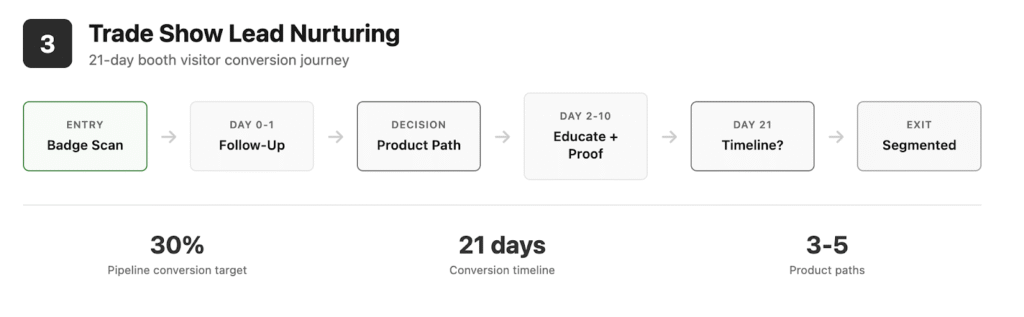
Journey #3: Trade Show Lead Nurturing
Goal: Convert booth visitors into sales-qualified conversations by addressing their specific product interests and technical questions.
Why this matters: Manufacturers invest $50K-$200K in major trade shows but most leads go cold because follow-up is generic. Journey Builder lets you personalize based on actual booth interactions.
The Journey Flow
Entry Event: Badge scan at booth OR business card collection (imported to Salesforce Campaign)
Day 0: Same-Day Follow-Up
- Email: “Great Meeting You at [Trade Show Name]”
- Content: Personalized based on product interest noted during scan
- Personalization AMPscript: %%[ IF @productinterest == “Industrial Pumps” THEN]%% …
- CTA: “Access the Materials We Discussed”
- Wait Until: 4 hours after badge scan
Day 1: Product-Specific Content
- Decision Split: What product did they express interest in? (3-5 paths based on notes)
- Path A: Industrial Pumps → Application guide for pumps
- Path B: Control Systems → Integration specifications
- Path C: Safety Equipment → Compliance certification documents
- Email: Custom content per path
- Journey Builder Action: Add to relevant product interest list in Salesforce
Day 2: Show Special Offer
- Email: “[First Name], Your [Trade Show] Special Pricing Ends Friday”
- Content: Show-specific pricing sheet, order form
- Urgency: 7-day countdown (if applicable)
- Decision Split: Engagement level (opened both previous emails? → hot path)
Hot Lead Path:
- Email: Direct from sales rep (triggered by Journey Builder)
- Salesforce Action: Create a high-priority task for the rep
- SMS to Rep: “Hot lead from [Trade Show]: [Name] at [Company]”
Day 5: Technical Webinar Invitation
- Email: “Deep Dive Webinar: [Product Category]”
- Content: Register for live technical Q&A
- Wait Until: Webinar date +1 day
- Decision Split: Attended? (Yes → follow-up path, No → send recording)
Day 10: Case Study + ROI
- Email: “How [Customer Name] Achieved [Result] with [Product]”
- Content: Detailed case study, ROI calculator
- CTA: “Request Custom ROI Analysis”
Day 14: Procurement-Ready Resources
- Email: “Everything You Need to Spec [Product] for Your Project”
- Content: Specification template, compliance certifications, vendor questionnaire
- Decision Split: Download activity (Yes → sales-ready, No → extended nurture)
Day 21: Final Touchpoint
- Email: “Following Up from [Trade Show] – Any Questions?”
- Content: Link to request a sales call or demo
- Survey: “What’s your timeline for this type of purchase?” (0-3 months, 3-6 months, 6-12 months, 12+ months)
- Decision Split: Timeline response
- 0-3 months → Hot lead to sales immediately
- 3-6 months → Move to active pipeline nurture
- 6-12 months → Quarterly check-in journey
- 12+ months OR no response → Annual awareness nurture
Key Journey Builder Settings
- Contact Entry: One-time only (per trade show event)
- Goal: 30% move to active sales pipeline within 21 days
- Exit Criteria: Converted to opportunity OR moved to a different nurture journey
- Data Extension: Trade Show Leads DE (includes product interest, booth notes, sales rep territory)
- Salesforce Campaign: Sync journey participants to the campaign for ROI tracking

Journey #4: Post-Purchase Installation & Training
Goal: Ensure successful installation, train operators, and set up preventive maintenance to drive parts replenishment and renewals.
Why this matters: Post-purchase is where manufacturing companies win or lose long-term revenue. Proper installation reduces warranty claims, training improves safety and performance, and maintenance reminders drive recurring parts revenue.
The Journey Flow
Entry Event: Order marked “Shipped” in Salesforce (API trigger)
Day 0: Shipment Confirmation
- Email: “Your [Product] Has Shipped – Here’s What’s Next”
- Content: Tracking number, expected delivery date, pre-installation checklist
- SMS: “Your [Product] is on the way. Track it here: [link]”
- Wait Until: Expected delivery date
Day of Delivery: Installation Preparation
- Email: “Preparing for [Product] Installation”
- Content: Installation manual PDF, safety requirements, and tools needed
- Video: 10-minute installation overview
- CTA: “Schedule Installation Support Call (Free)”
- Decision Split: Did they schedule support? (Yes → install support path, No → self-install path)
Install Support Path:
- Salesforce Action: Create a case for the support team
- Email to Support: “[Company] needs installation assistance for [Product]”
- Email to Customer: “Your installation call is scheduled for [Date/Time]”
- Wait Until: Scheduled call date +1 day
- Email: “Post-Installation Checklist + Performance Verification”
Self-Install Path:
- Email: “Installation Tips from Our Experts”
- Content: Troubleshooting guide, common mistakes to avoid
- Wait Until: 3 days post-delivery
- Email: “How Did Installation Go? We’re Here to Help”
- Survey: Installation difficulty rating + optional support request
Week 1: Operator Training
- Email: “Get the Most Out of Your [Product] – Training Resources”
- Content: Operating manual, training video series, safety protocols
- Journey Builder Action: Enroll in training webinar (if complex product)
- Decision Split: Product complexity
- Simple product → Video training + PDF
- Complex product → Live webinar + certification
Week 2: Performance Optimization
- Email: “Optimizing [Product] Performance for Your Application”
- Content: Application-specific tuning guide, performance benchmarks
- CTA: “Request Performance Audit (First 30 Days Free)”
Week 4: First Maintenance Reminder
- Email: “30-Day Maintenance: Keep Your [Product] Running at Peak Performance”
- Content: Maintenance checklist, parts list, maintenance video
- Commerce Cloud Integration: “Order Maintenance Kit” (pre-filled cart with required parts)
- Decision Split: Ordered parts? (Yes → customer health = good, No → follow-up reminder)
Month 3: Extended Warranty Offer
- Email: “Protect Your Investment: Extended Warranty Available”
- Content: Warranty comparison chart, ROI of extended coverage
- CTA: “Add Extended Warranty”
- Decision Split: Purchased warranty? (Yes → premium customer path, No → standard path)
Month 6: Preventive Maintenance
- Email: “6-Month Service Due: [Product Name]”
- Content: Service checklist, replacement parts recommendations
- SMS: “Time for [Product] maintenance. Order parts here: [link]”
- Decision Split: Parts ordered? (Yes → engaged customer, No → churn risk flag in Salesforce)
Month 12: Renewal & Upsell
- Email: “It’s Been a Year with [Product] – Let’s Talk About What’s Next”
- Content: Annual review, upgrade options, complementary products
- Survey: Satisfaction score + expansion interest
- Salesforce Action: Create a renewal opportunity for the account manager
Key Journey Builder Settings
- Contact Entry: Allow re-entry for each new product purchase
- Goal: 80% complete installation successfully + 60% order maintenance parts within 6 months
- Exit Criteria: Product marked inactive OR customer requests journey exit
- Data Extension: Product Purchase DE, Maintenance Schedule DE
- Integration: Commerce Cloud for parts ordering, Service Cloud for support cases
Implementation Best Practices for Manufacturing
Now that you’ve seen the journeys, here’s how to actually build them without losing your mind.
Start Small, Scale Smart
Don’t try to build all four journeys at once. Start with the highest-value journey for your business:
- Heavy trade show presence? Start with Journey #3
- New product launching soon? Start with Journey #1
- Long sales cycles killing you? Start with Journey #2
- Are high service costs eating into the margin? Start with Journey #4
Build one journey, test it for 30-60 days, measure results, then expand.
Content Before Automation
The biggest mistake? Building complex journeys with placeholder content. Journey Builder can’t fix bad content.
Before you build, create and approve:
- Email templates (plain-text for engineers, not image-heavy designs)
- Technical documents (spec sheets, application guides, white papers)
- Video content (installation, training, product demos)
- Sales enablement tools (comparison charts, ROI calculators)
Marketing Cloud is the delivery mechanism, not the content creator.
Data Hygiene Is Everything
Your journeys are only as good as your data. Essential data points for manufacturing journeys:
- Industry field (for content personalization)
- Product interest (from forms, trade shows, downloads)
- Territory/Region (for rep assignment and content localization)
- Account size (distributor vs. end user vs. OEM)
- Purchase history (for post-purchase journeys)
Clean your data before you build. Journey Builder will expose every bad phone number, misspelled email, and duplicate contact.
Decision Splits That Actually Matter
Don’t create decision splits just because you can. Use splits that drive different business outcomes:
- Engagement splits → High engagement gets sales outreach, low engagement gets extended nurture
- Product interest splits → Route to specialized content paths
- Timeline splits → Match your follow-up cadence to their buying timeline
- Geographic splits → Territory-based rep assignment
Avoid vanity splits like “clicked vs. didn’t click” if you’re sending them the same content next, regardless.
Measure What Matters
Track metrics that your CFO cares about, not just email open rates:
- Journey #1: % of distributors trained + first sale timeline
- Journey #2: Spec download → sales conversation conversion rate
- Journey #3: Trade show lead → pipeline conversion rate
- Journey #4: Parts replenishment rate + warranty claim reduction
Connect Journey Builder performance to Salesforce campaign ROI to prove value.
What About Account Engagement (Pardot)?
Fair question. Should you use Journey Builder or stick with Pardot’s Engagement Studio for manufacturing?
Journey Builder wins for:
- Multi-channel (email + SMS + push)
- Distributor communication at scale (200+ distributors)
- Complex decision logic with multiple paths
- Visual journey mapping that execs can understand
Pardot Engagement Studio wins for:
- Lead scoring and grading (behavioral + demographic)
- Tight Sales Cloud integration for lead lifecycle
- Simpler setup if you’re email-only
- Lower cost for smaller organizations
Most manufacturers running both use Pardot for lead nurturing and Journey Builder for customer/distributor communication. Not ideal, but it works.
The Bottom Line
Marketing Cloud Journey Builder isn’t designed for manufacturing, but it can work beautifully if you stop trying to copy SaaS templates and build journeys that match how engineers, procurement teams, and distributors actually buy.
Long cycles, technical content, committee buying, and distributor networks aren’t obstacles—they’re opportunities to build journeys that your competitors (still sending batch-and-blast emails) can’t match.
Start with one journey. Build it right. Measure it honestly. Then scale.
Your distributors will thank you. Your sales team will thank you. And your engineers might even tolerate your marketing emails.
Need help building manufacturing-specific Marketing Cloud journeys that actually work? Digital Mass specializes in Salesforce implementations for manufacturers who are tired of generic B2B marketing advice. We’ll help you design, build, and measure journeys that match your sales process. Not someone else’s template.
Schedule a SprintZero consultation